Skip to product information
1 of 7

Tesla Car Karaoke Microphone for Tesla Model Y/3/X/Cybertruck, Rechargeable Caraoke Mic with USB-A & USB-C Receiver

Tesla Car Karaoke Microphone for Tesla Model Y/3/X/Cybertruck, Rechargeable Caraoke Mic with USB-A & USB-C Receiver

Regular price $83.00 USD
Regular price $0.00 USD Sale price $83.00 USD
Sale Sold out

Introducing our company's latest recording microphone, which boasts excellent sound quality. We're also offering a complimentary microphone stand and headphones. If you're interested, please click the link below for more details:



Question 1: Can I use both microphones together?
Answer: Yes, you can purchase the two mics version. Once the receiver is inserted into the car, both microphones will work simultaneously.
However, if you bought the single microphone version and want another microphone late, that's not OK because the receiver you have can only connect with one microphone.
The receivers firmware for single and dual microphone are different, so it's recommended that friends just buy the 2mics version directly.

Question 2: Will the microphone work with my Tesla car?
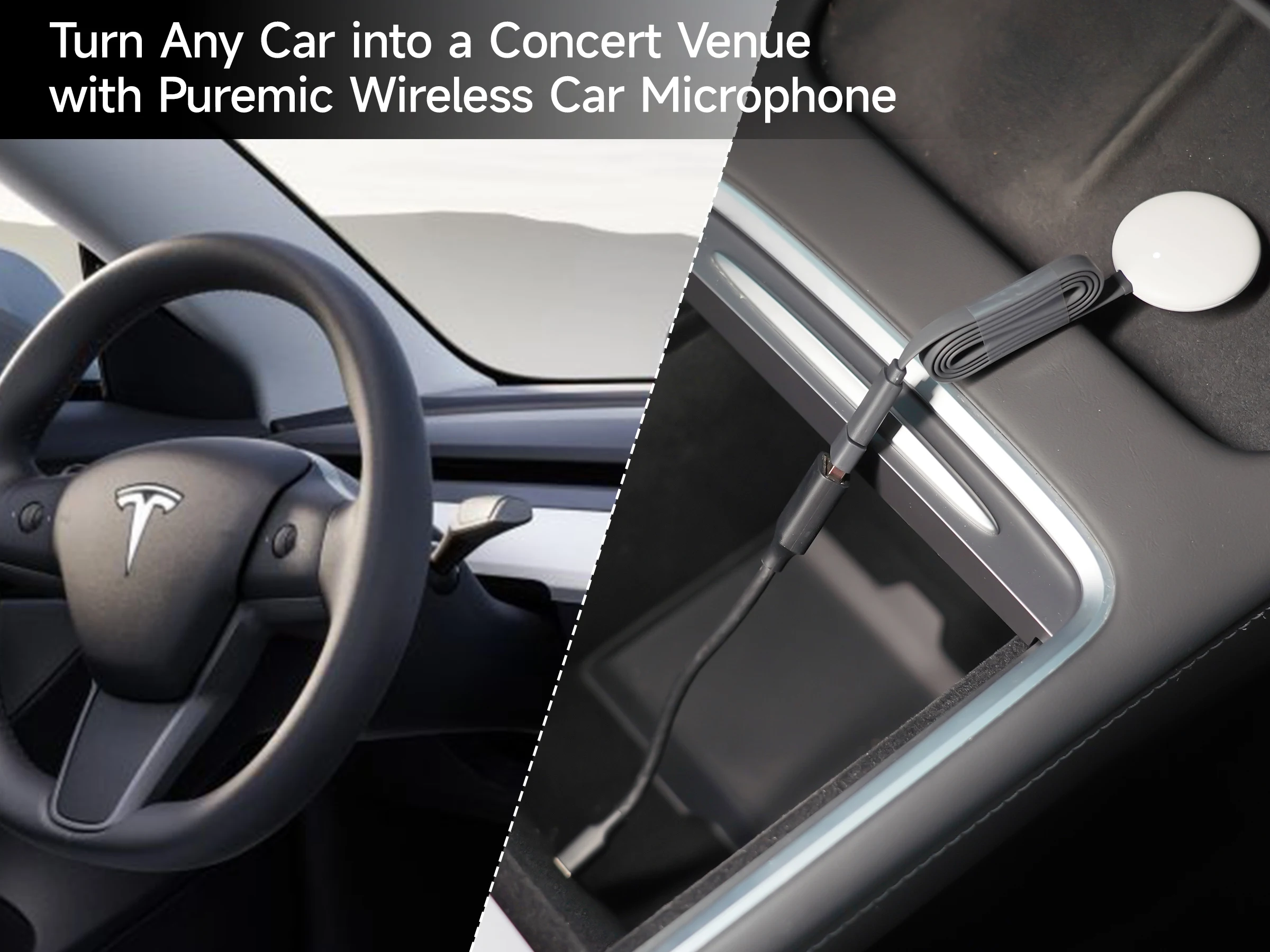
Answer: The microphone is suitable for Tesla Model Y Model X, Model 3, Other models not sure right now!
And if your car with old firmware version like purchased years ago pls update your Tesla firmware to the newest.

Question 3: Is it possible to charge the microphone after it runs out of power?
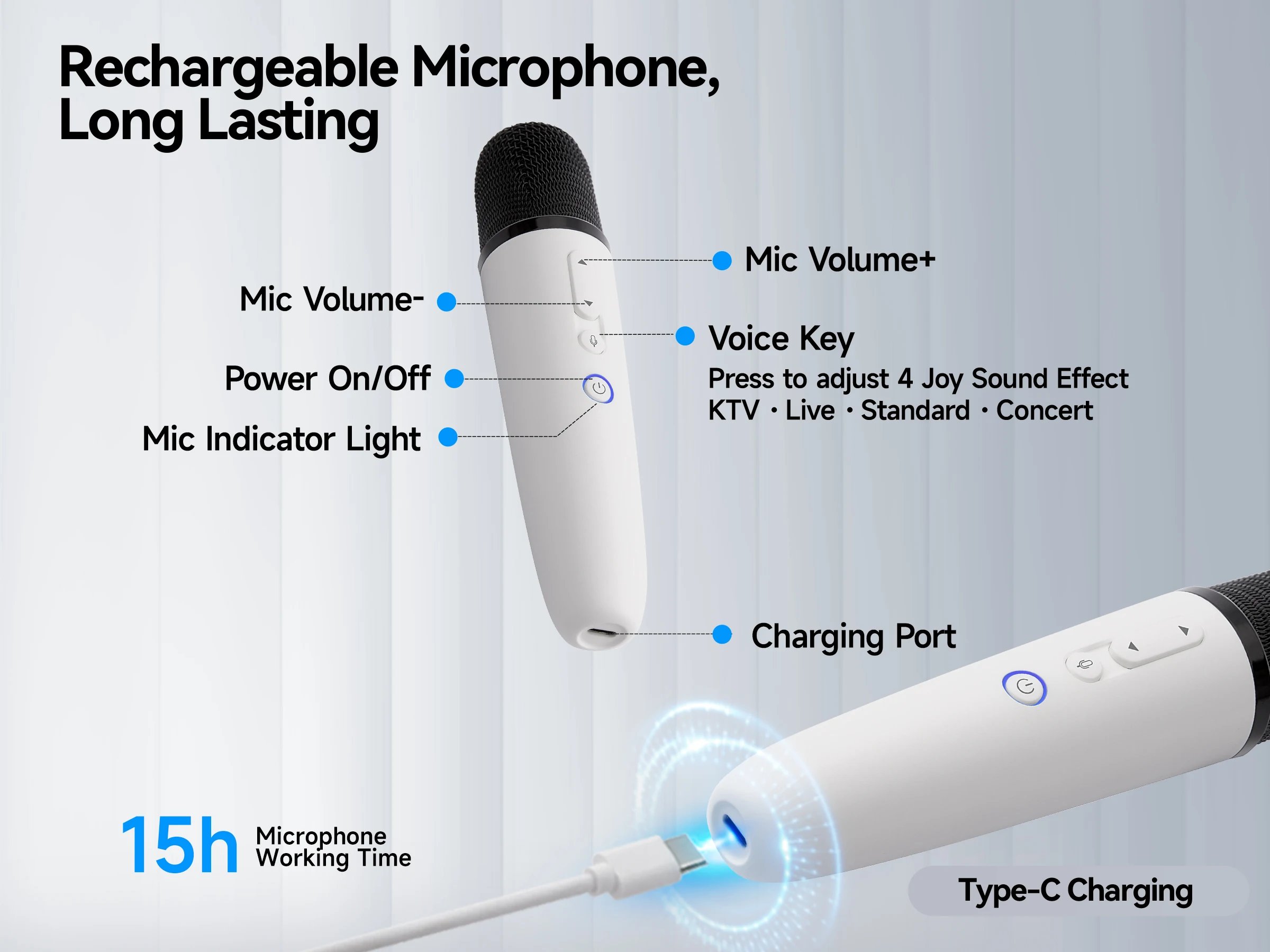
Answer: Absolutely, the microphone has a built-in lithium battery and a USB-C charging port. The product includes a USB-C cable for charging.

Question 4: Do I need to pair the microphone with the usb receiver?
Answer: No, there's no need to pair the microphone with the receiver as it comes pre-paired. Simply power on and start singing.
However, if you encounter any issues like no sound from the microphone, you can try repairing it.

Question 5: My car only has USB-C ports, how can I use the receiver?
Answer: In such a situation, please remove USB-A converter,as we already offered both USB-A and USB-C Jack.

Question 6: Microphone volume is low how can I do?
Answer: Please adjust the master volume of your Tesla to the highest. When you open music/karaoke apps such as TJ Media,YouTube or Stingray, you will be able to control the volume of the music and microphone separately within the app.Therefore, it is important to increase the master volume to a higher level in order to have the flexibility to adjust other volumes accordingly.

If no sound issues persist, you can follow these instructions to Re-Pairing the microphone:
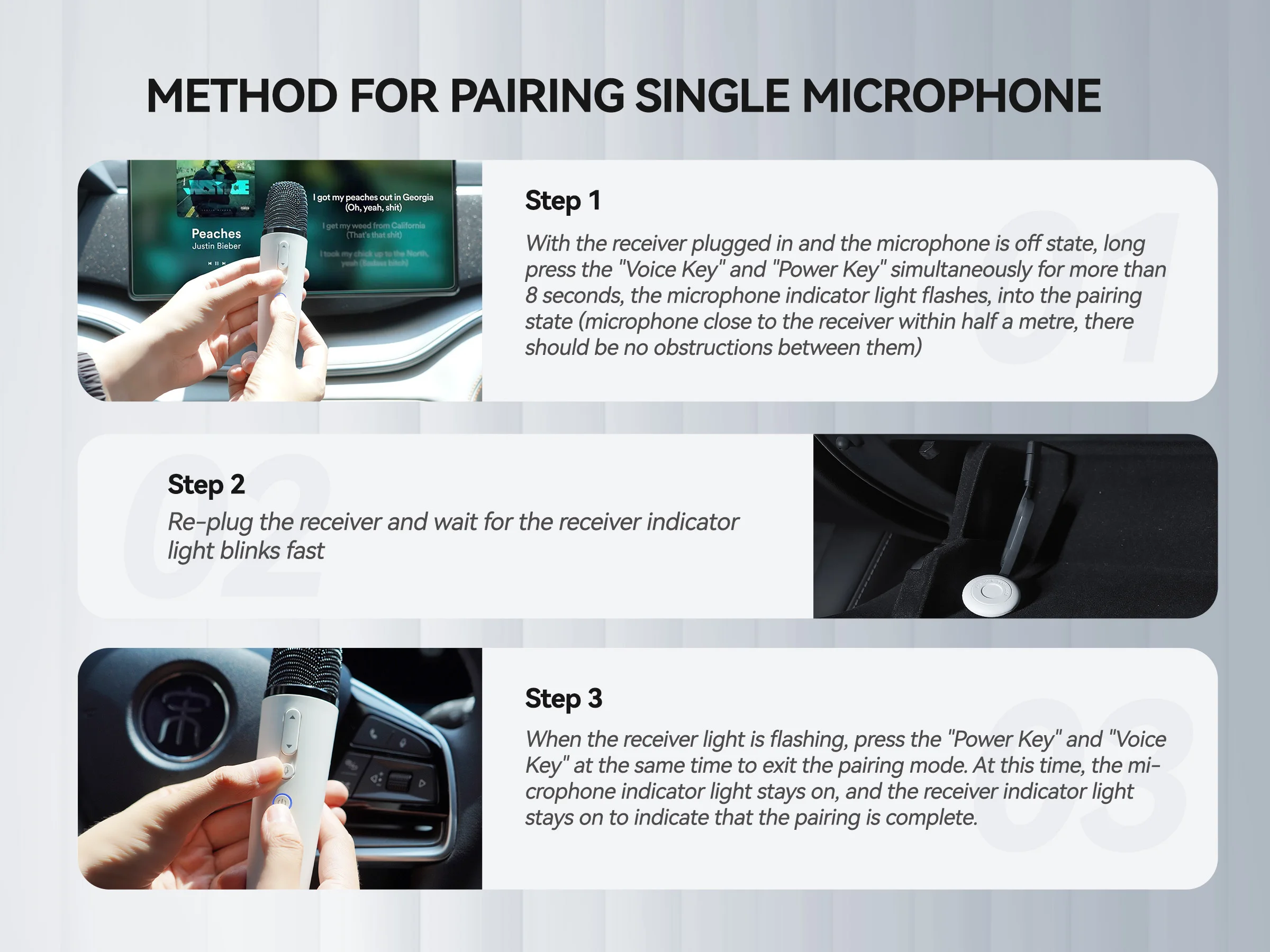
Method for Pairing Single Microphone


Step 1

With the receiver plugged in and the microphone is off state, long press the "Voice Key" and "Power Key" simultaneously for more than 8 seconds, the microphone indicator light flashes, into the pairing state (microphone close to the receiver within half a mete, there should be no obstructions between them)


Step 2

Re-plug the receiver and wait for the receiver indicator light blinks fast


Step 3

When the receiver light is flashing, press the "Power Key" and "Voice Key" at the same time to exit the pairing mode. At this time, the microphone indicator light stays on, and the receiver indicator light stays on to indicate that the pairing is complete.


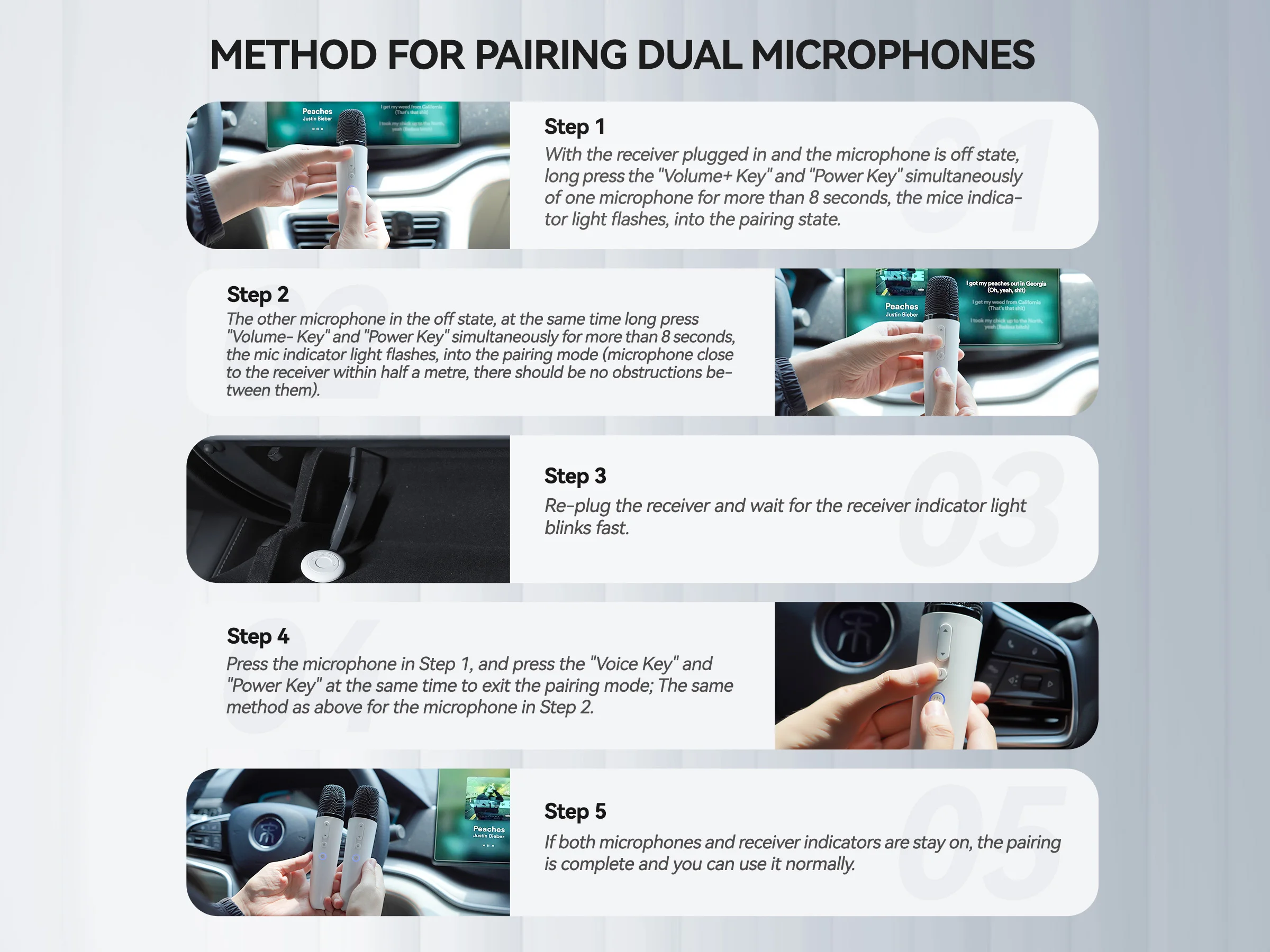
Method for Pairing Dual Microphones


Step 1

With the receiver plugged in and the microphone is off state, long press the "Volume+ Key" and "Power Key" simultaneously of one microphone for more than 8 seconds, the mice indicator light flashes, into the pairing state


Step 2

The other microphone in the off state, at the same time long press "Volume- Key" and "Power Key" simultaneously for more than 8 seconds, the mic indicator light flashes, into the pairing mode (microphone close to the receiver within half a met, there should be no obstructions between them)


Step 3

Re-plug the receiver and wait for the receiver indicator light blinks fast


Step 4

Press the microphone in Step 1, and press the "Voice Key" and "Power Key" at the same time to exit the pairing mode; The same method as above for the microphone in Step 2


Step 5

If both microphones and receiver indicators are stay on, the pairing is complete and you can use it normally.


View full details

Our Exiting Resuts

Sign up to receive your welcome offer, plus acess to product launches and exclusive offers

Shop Now
Before

Testimonials

  • Sarah Michell's

    My Daily Essencial

    ★★★★★

    This has become part of my morning routine because it keep my digestion smooth all day. I feel lighter, more energized , and way more confident in my clothes--not dealing with bloating has been such a relief.

  • Sarah Michell's

    My Daily Essencial

    ★★★★★

    This has become part of my morning routine because it keep my digestion smooth all day. I feel lighter, more energized , and way more confident in my clothes--not dealing with bloating has been such a relief.

  • Sarah Michell's

    My Daily Essencial

    ★★★★★

    This has become part of my morning routine because it keep my digestion smooth all day. I feel lighter, more energized , and way more confident in my clothes--not dealing with bloating has been such a relief.

  • Sarah Michell's

    My Daily Essencial

    ★★★★★

    This has become part of my morning routine because it keep my digestion smooth all day. I feel lighter, more energized , and way more confident in my clothes--not dealing with bloating has been such a relief.

    Comparison table

    Talk about how and why is your brand better than the others.

      Others

    Benefit

    Benefit

    Benefit